Smart Data Consumption Specifications
Background
From our user value propositions, users need to understand and track their data usage, so they don’t go over budget. Users should be enabled to do more with less. 1
User Stories
From the user research, we've identified user stories which will help guide us to materialize these value propositions.
As a cost-conscious phone user, I want to be able to track individual app network data usage so that I can be more informed how my data is being used.
As a cost-conscious phone user, I want to be able to restrict specific apps from using data entirely.
As a cost-conscious phone user, I want to be able to restrict specific apps from using data in the background.
As a cost-conscious phone user, I want to restrict the usage of background data on mobile networks when my battery level is low for all apps on the device.
As a multiple-SIM user who swaps SIMs, I want to easily update my usage plan configuration on my phone to reflect the SIM in use.
As a multiple-SIM user, I want to be able to separately track data usage associated with each SIM card so that I can understand my usage between SIMs.
As a user, when I go to use an app when I am out of data I want to be informed that I am out of data and be given the opportunity to purchase more so that I don't get a generic error message.
As a user, I want to be able to explicitly put my device into a mode whereby no mobile data can be used to allow me to control when I do not want data to be consumed.
As a user, I want to be able to override the data saving mode for a specific app, temporarily, so that I can use that app without all of my other apps also using data.
Firefox OS 2.1
First Time Experience
In each of these scenarios, the user has never opened the usage app and has never configured their data plans. There is a large flow skipped, which is the actual configuration of a user's plan in Figure 3.0 of each scenario. See the SIM Plan Configuration section for more details.
Notification Tray Discovery
In this scenario, the user discovers the usage app through the notification tray.
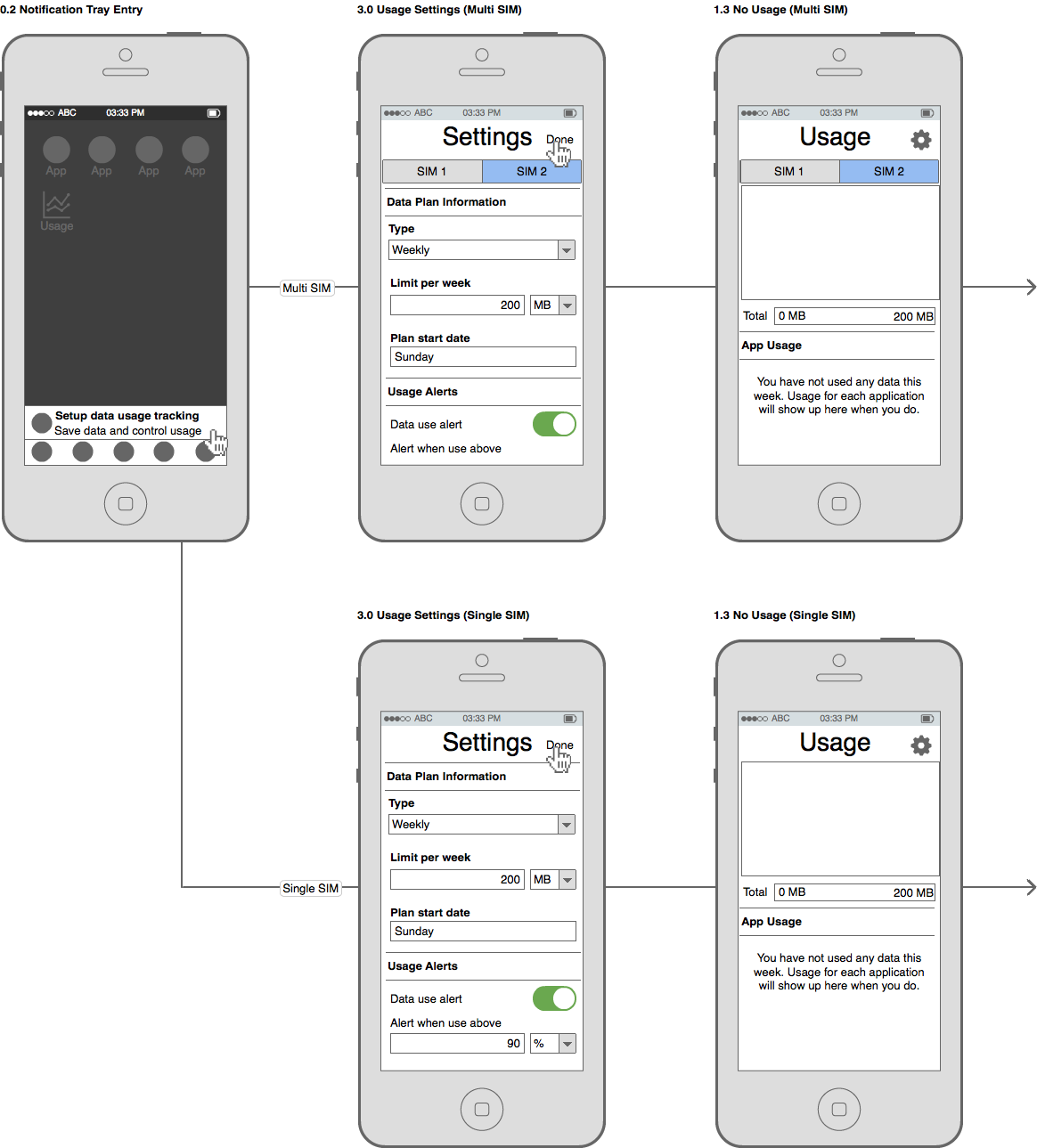
In a multi-SIM device, if the user does not open the other SIM configuration, it should be in an unconfigured state. A SIM in an unconfigured state will show a screen such as Figure 5.1 in the following section.
Home Screen Discovery
In this scenario the user discovers the usage app through the home screen.
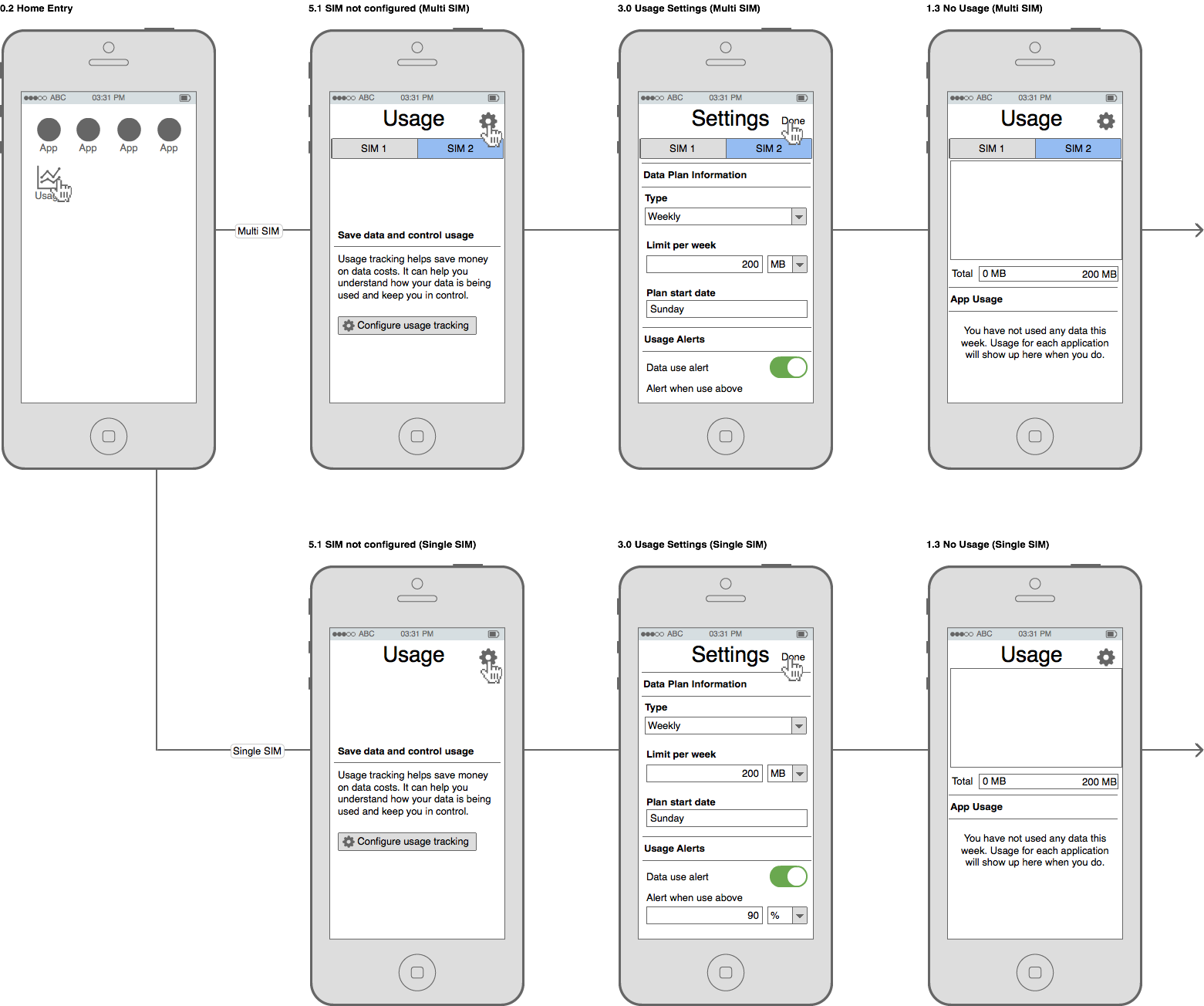
As with the previous section, a SIM card that did not have its configuration opened should be left in an unconfigured state.
Settings App Discovery
In this scenario, the user has come across the usage app through the navigating through the system settings (Settings > Cellular & Data > SIM 2).
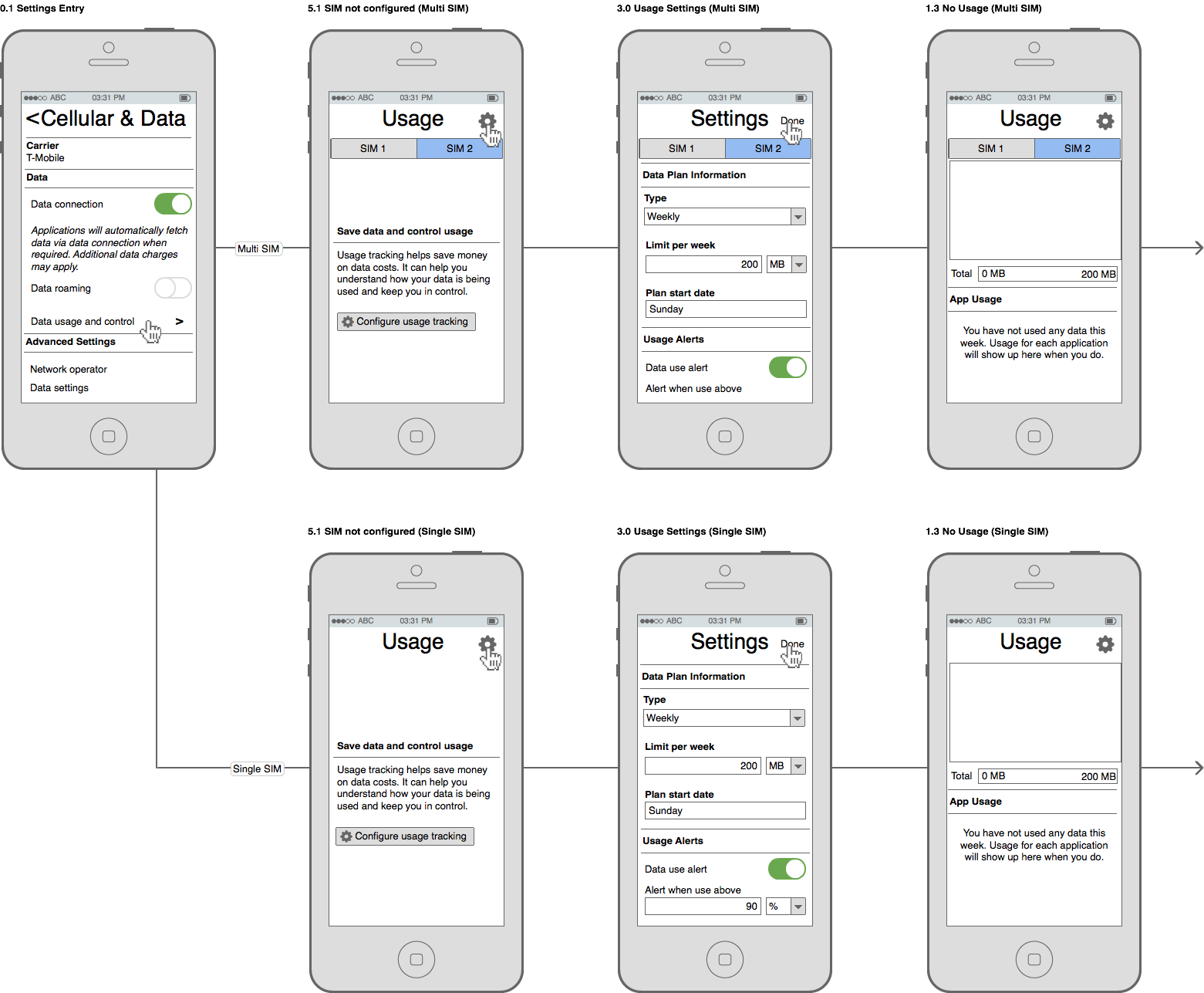
In a mulit-SIM configuration, the selected SIM should correspond to the SIM active in the "Cellular and Data" settings view.
Usage Overview
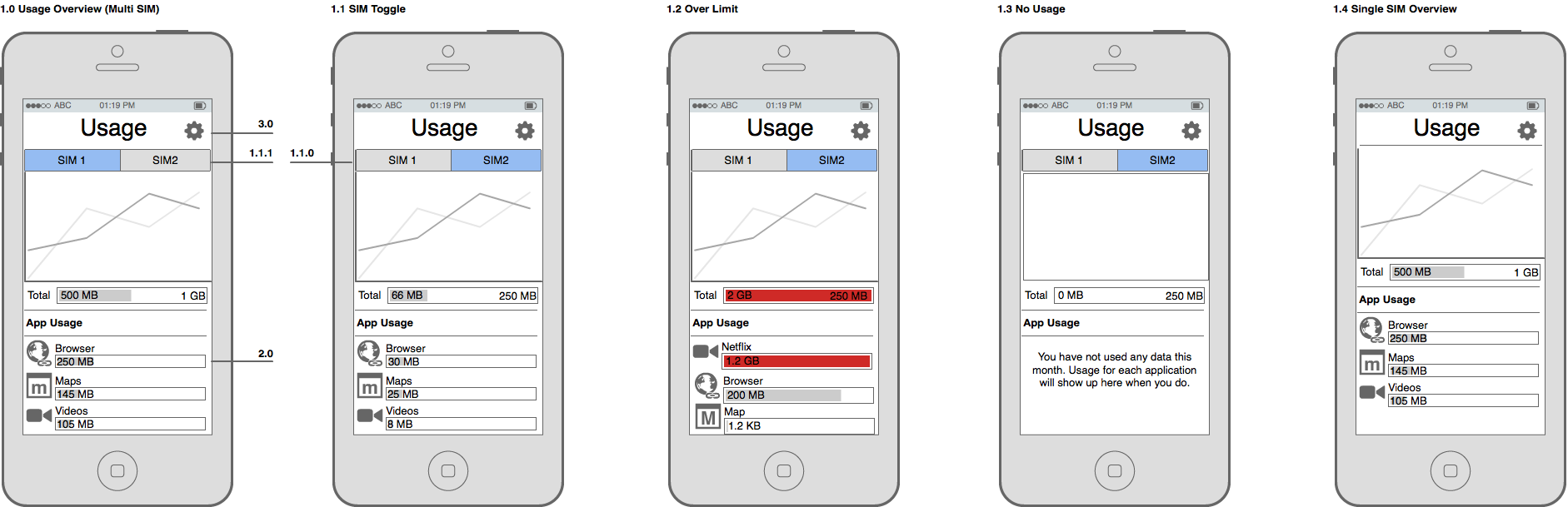
In a multi-SIM configuration, the SIM chosen for data connectivity in the SIM Manager should be active view which is shown in Figure 1.0. The ordering of the SIMs in the tab bar should not change.
The bar graphs for each application's usage should be proportional to the limit displayed. In the case that an app's usage is too small to be shown accurately as a bar graph, a small sliver should be shown as in the Map application in Figure 1.2.
Usage bars which go above the limit should display a full bar graph along with a visual style which indicates this. As an example, Figure 1.2 shows the bars displayed in red. The visual style should be sensitive to cultural meanings of colours.
Application Data Control
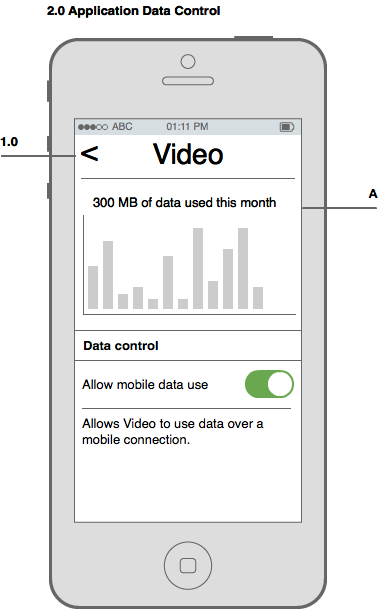
The application data control view should show data in the context of the selected SIM from the previous screen. However, data control toggles should be global toggles, and carry the same state regardless of the SIM context.
Pressing the back button in the top left should go back to the previous screen, ensuring of the previous screen is preserved.
The cycle's usage, seen in A, should substitute "month" with the user's chosen cycle. For example, if they are on a weekly cycle it would say "X MB of data used this week".
All apps data control
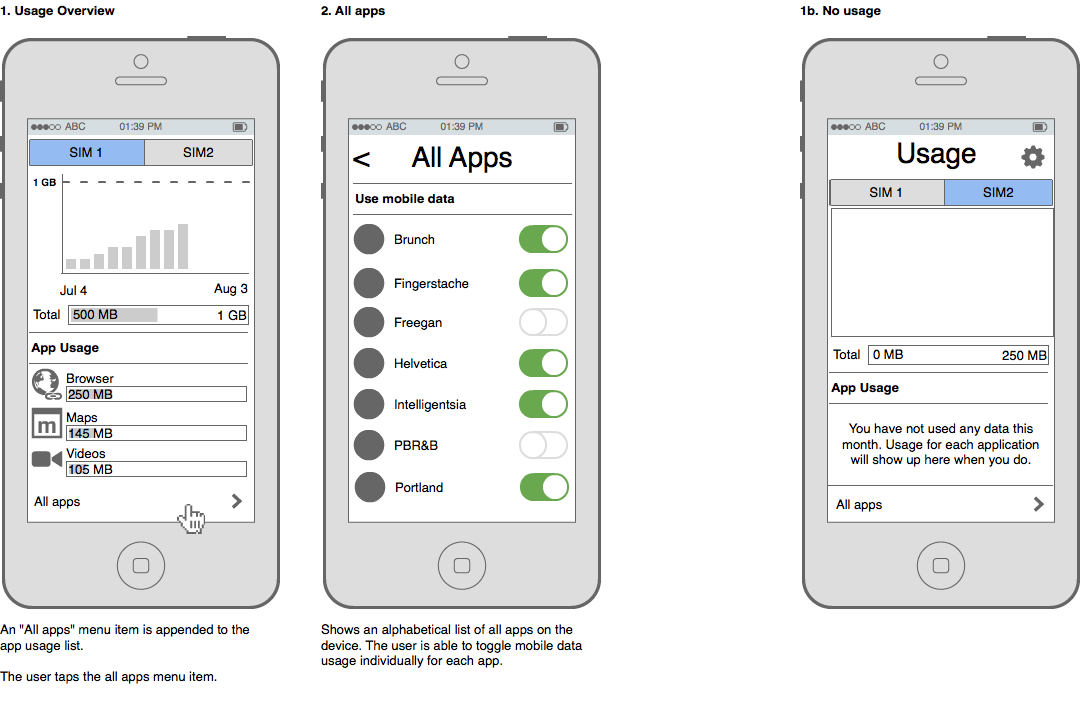
The user should be able to control mobile data use for applications which have not used data in the current data cycle. Without an all apps section, the apps' data controls would be inaccessible.
SIM Plan Configuration
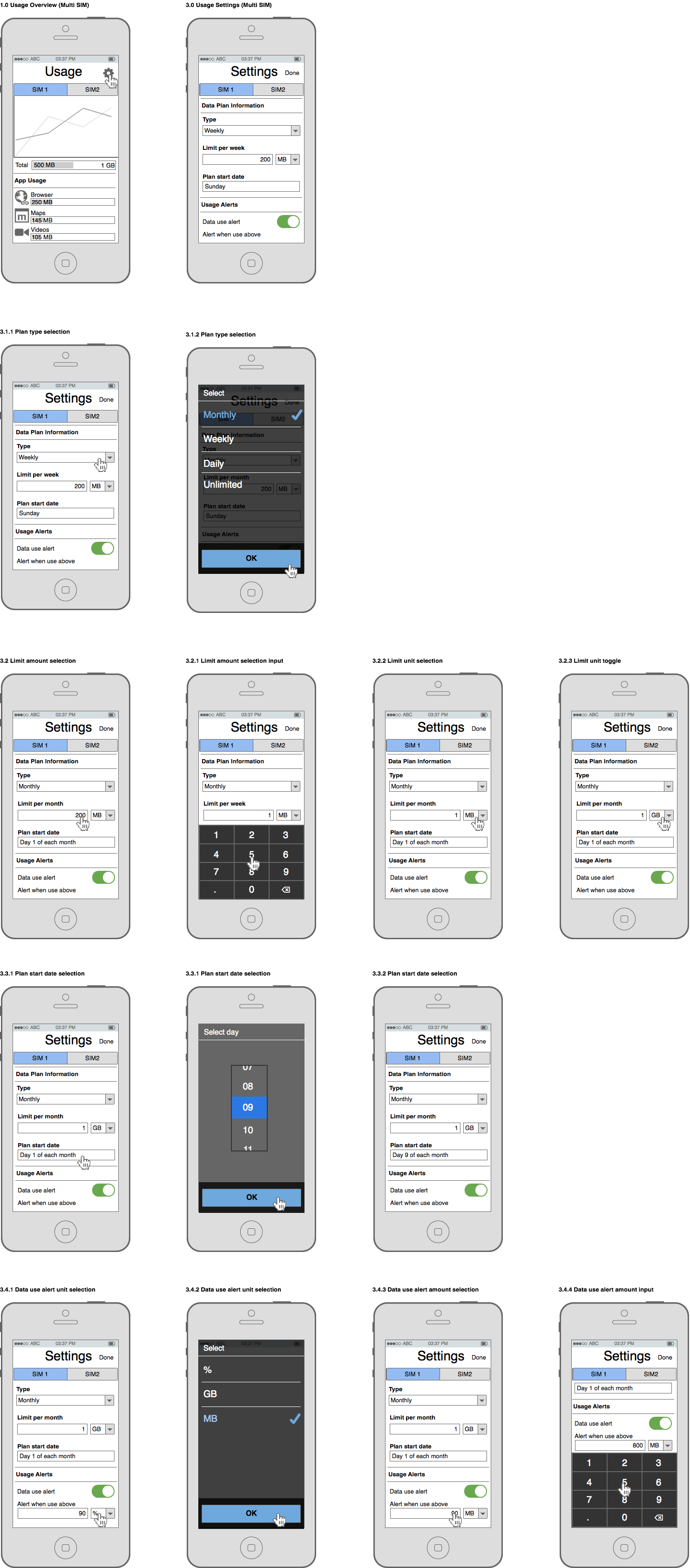
When a user has changed their data plan with their service provider, they will want their usage app configuration to reflect these changes. In the following story, the user has upgraded from a weekly 200 MB plan to a 1GB monthly plan.
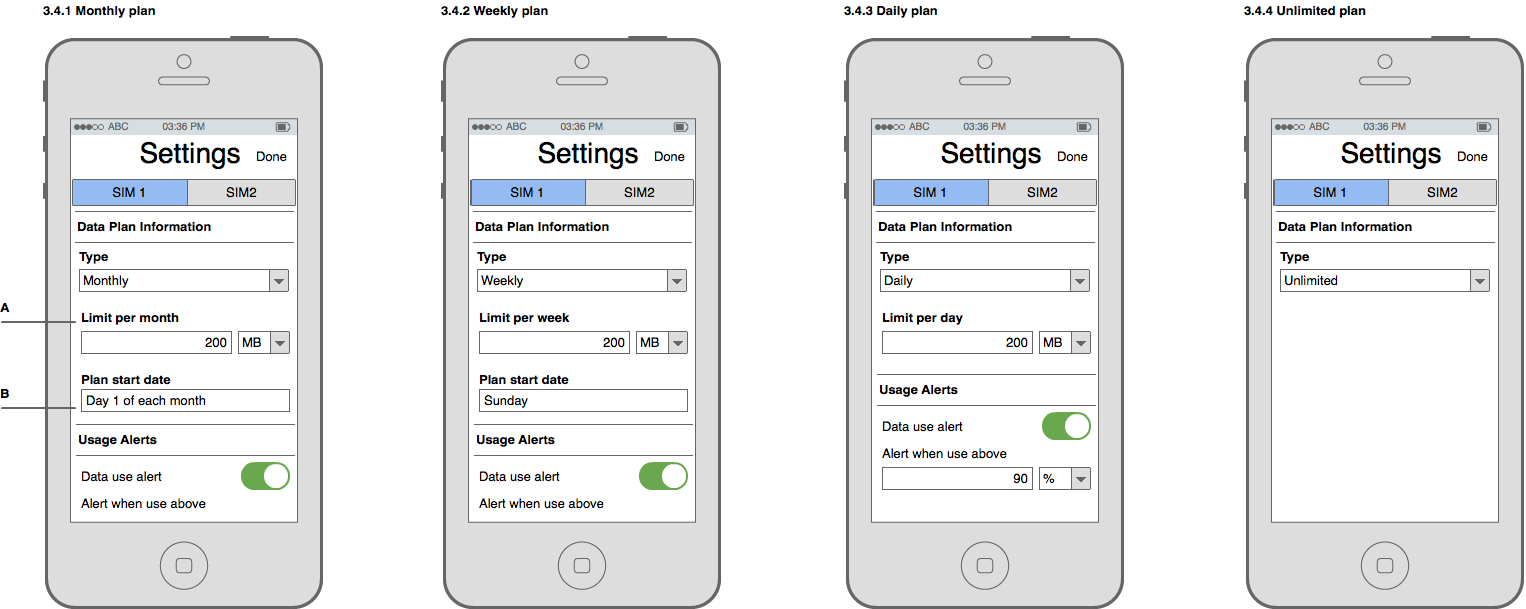
The limit amount label, A, should update to reflect the type of plan specified. "Limit per month", "Limit per week", and "Limit per day" should be used for monthly, weekly and daily plan types respectively.
The plan start date, B, should update based on the plan type as well. The day of the week should be shown for weekly plans. "Day X of each month" should be shown for monthly plans. The input field should not be shown at for daily plans.
If the unlimited plan type is selected, no other configuration should be shown. No notifications should ever be shown. The usage notification tray should not be shown either.
These behaviours are reflected in the following figures.
The device should remember SIM cards inserted and their respective plan configurations.
Notification tray bar
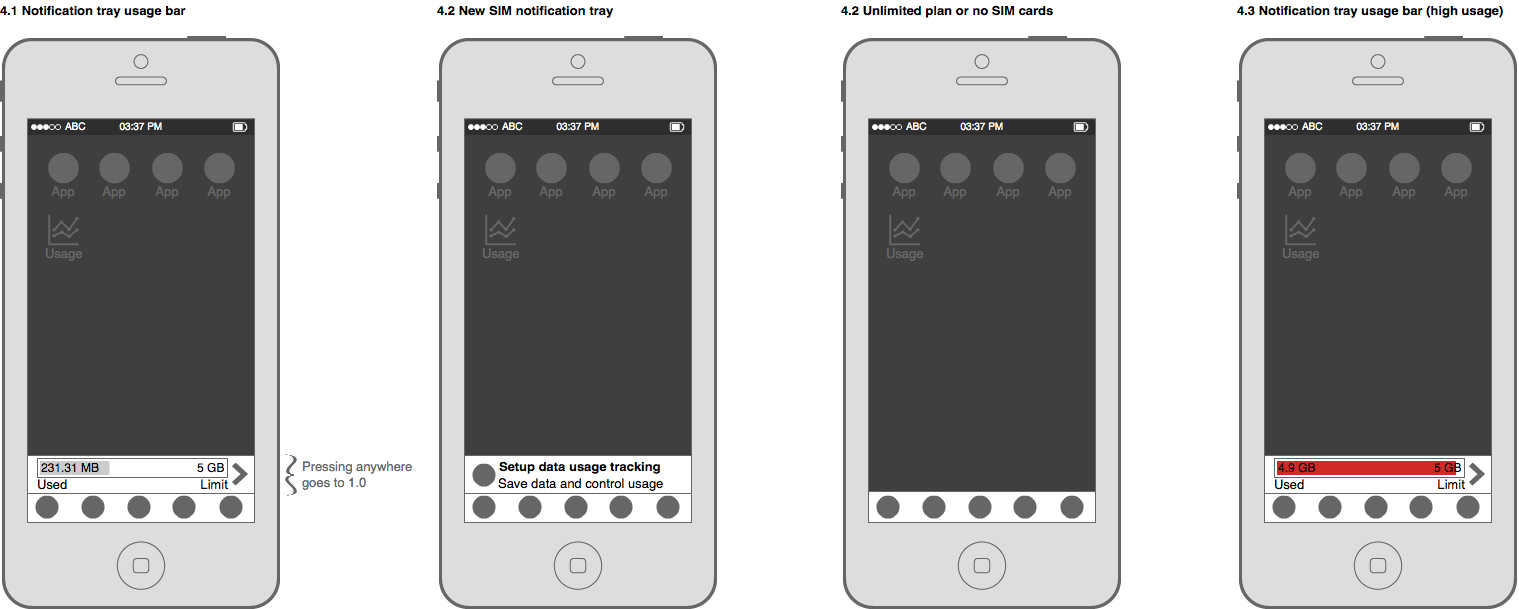
The usage bar in Figure 4.1 should show the usage of the SIM selected for data use. In an unlimited plan configuration or when no SIM card is inserted, no tray bar should be shown.
Data usage alerts
In the following scenario, the user has reached the threshold they've defined for data use alerts.
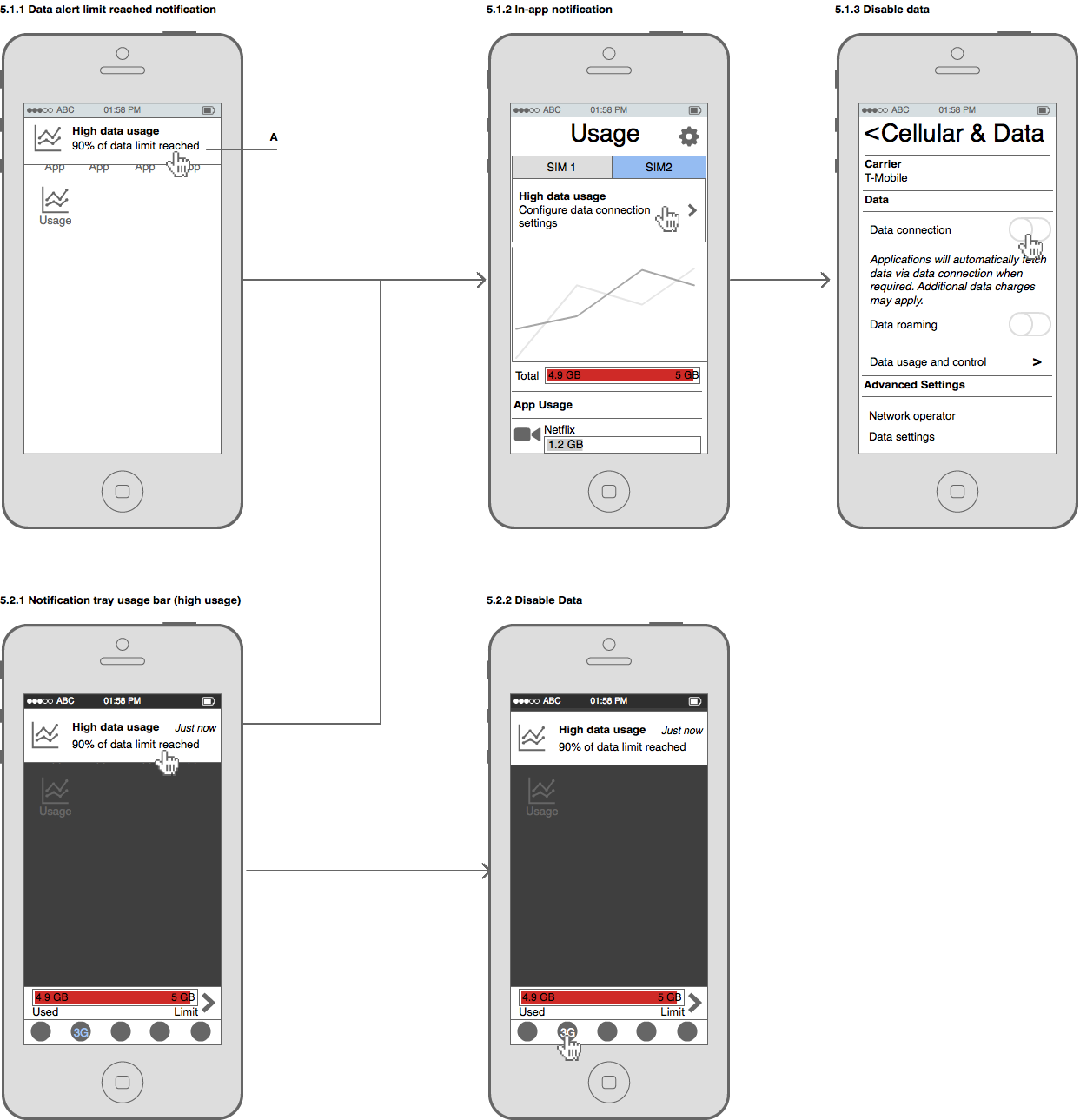
The notification text, A, should be adjusted for the unit of data limit reached. When a MB or GB limit is reached, the text should read "200 X of data used".
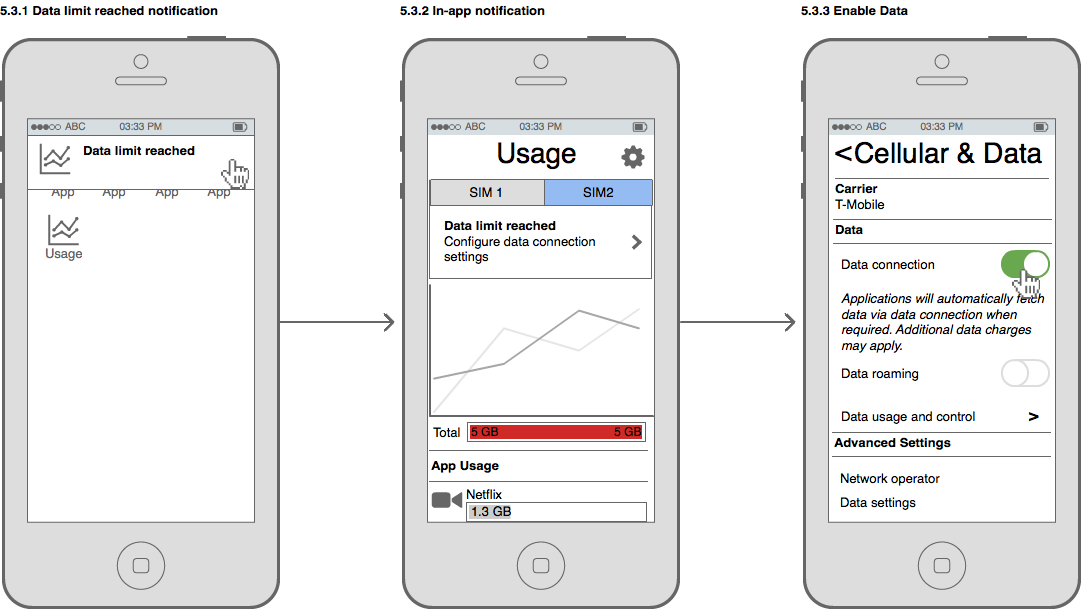
In the following scenario, the user has reached their defined data limit.
Chart
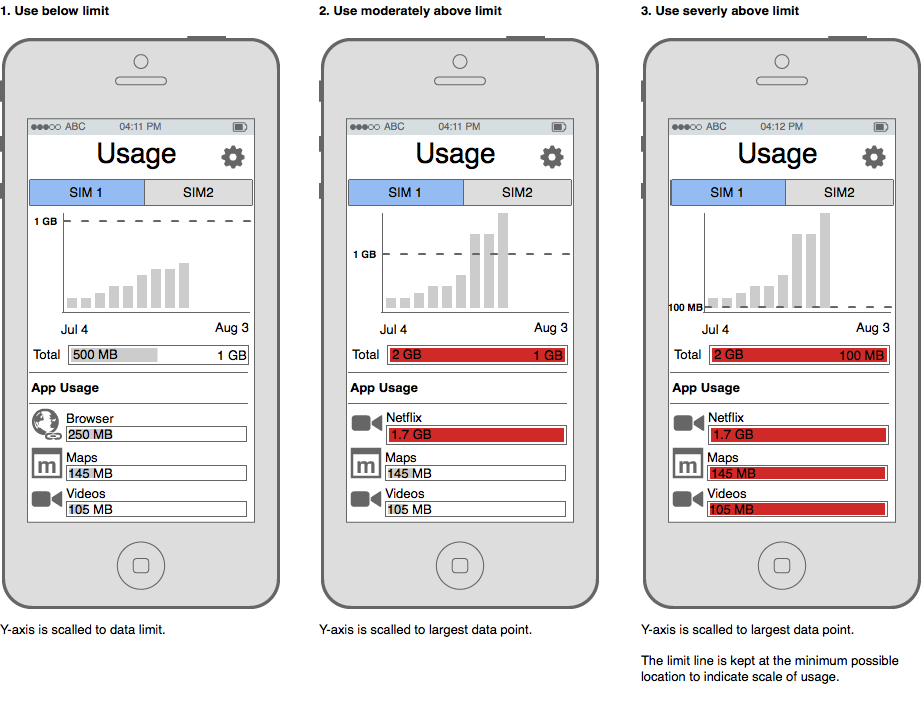
The data usage chart should be a cumulative graph spanning the specified cycle length. The x-axis should indicate each day of the cycle. The start and end points of the x-axis should be the start and end points of the cycle.
The y-axis should show how much data has been used for the month at that day (cummulative). The scaling behaviour is defined in the follow figure.
Data savings tips
Disabled app behaviour
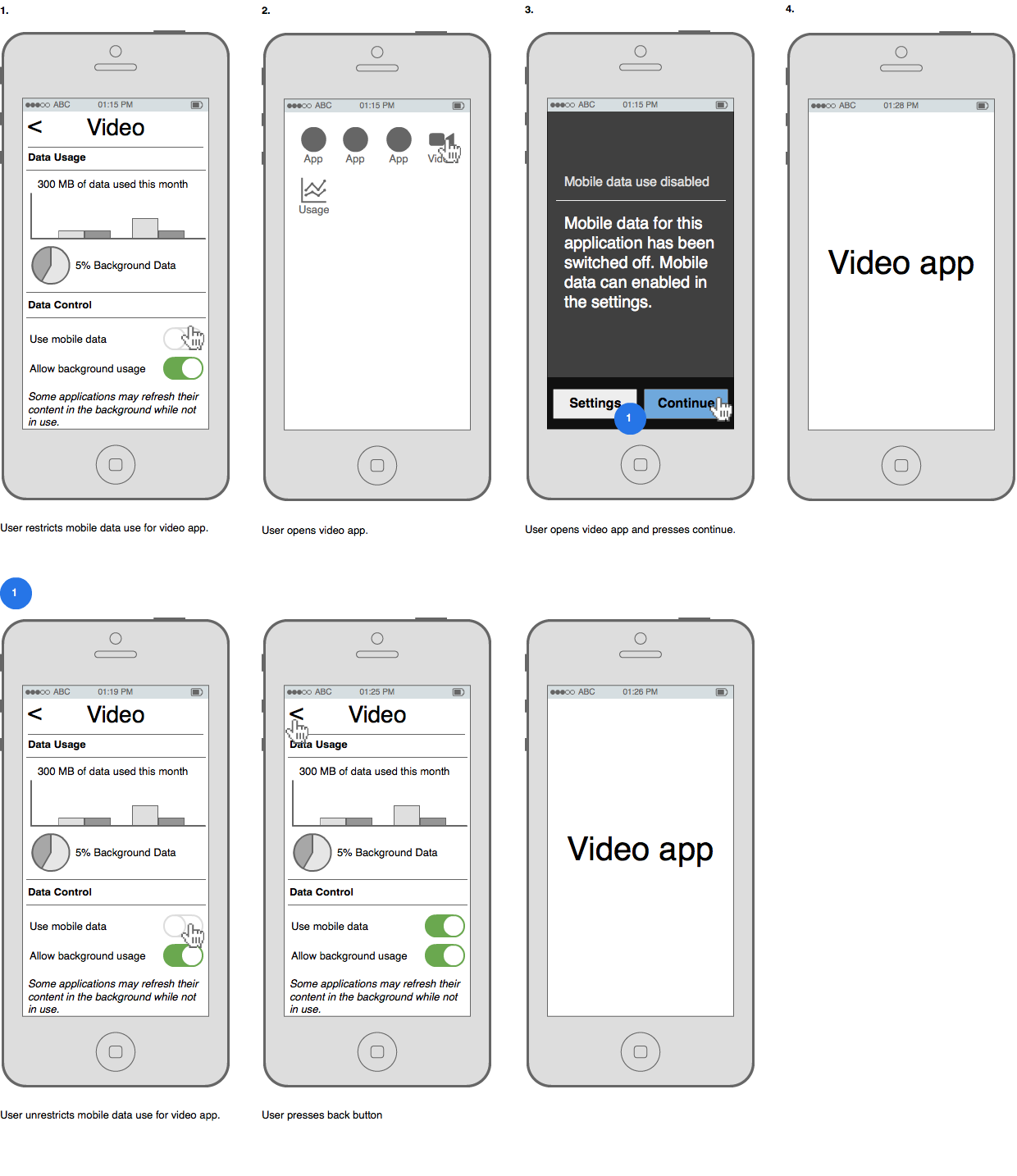
The disabled app popover should only be shown when the user launches the app. It should not be shown when doing ordinary task switching. If the system kills the app due to low memory and the user task switches, the app popover should not be shown.
Unused secondary SIM slot
In multi-SIM devices with only one SIM card inserted, the device should follow the single SIM versions of the specifications.
Interactive Prototype
Motion
Settings Animation
The settings tray should slide in with a quadratic ease-out curve. When sliding out of view, it should follow a ease-in curve.